

A private, citable knowledge index, built on workstations you already own
The self-hosted alternative to six-figure enterprise search.
Every organization adopting AI agents hits the same wall: the agents are only as useful as what they can see, and what they cannot see is the decades of documents sitting in file stores. Cloud RAG services take the corpus outside your boundary and price per seat and per query; building the pipeline in-house means procuring GPU capacity for a workload most of your organization does not think about. AiGrid uses the idle workstations you already own.
- Self-hosted RAG appliance running fully inside your boundary; air-gapped-capable
- Harvests idle workstations out-of-hours for OCR and embedding; no dedicated GPU procurement
- Documents stay in your own S3 bucket; nothing transits outside your boundary
- Retrieves, never generates; every result carries filename and page citation
- Serves any AI agent through a standard retrieval endpoint
Agents are only as useful as what they can see
Your organization has decades of unstructured documents (policies, reports, scanned files, engineering records) sitting in file stores. Agents cannot see any of it. The two conventional answers each cost something you would rather not spend: a cloud RAG service means the corpus leaves the building, and building the ingestion pipeline in-house means procuring GPU capacity, standing up an OCR and embedding service, and running it as a permanent workload.
The same organization already owns hundreds of workstations that do nothing between 19:00 and 06:00. The compute exists. It is idle at the wrong hours. The missing piece is a control plane that can distribute the work safely across machines nobody wants touched during the day.
Portainer-AiGrid is that control plane. Documents stay in your S3 bucket. OCR and embedding run on your workstations overnight. What comes out is a private, citable knowledge index built at close to zero marginal infrastructure cost, on the management platform your organization runs anyway.
Two pieces to install, one story
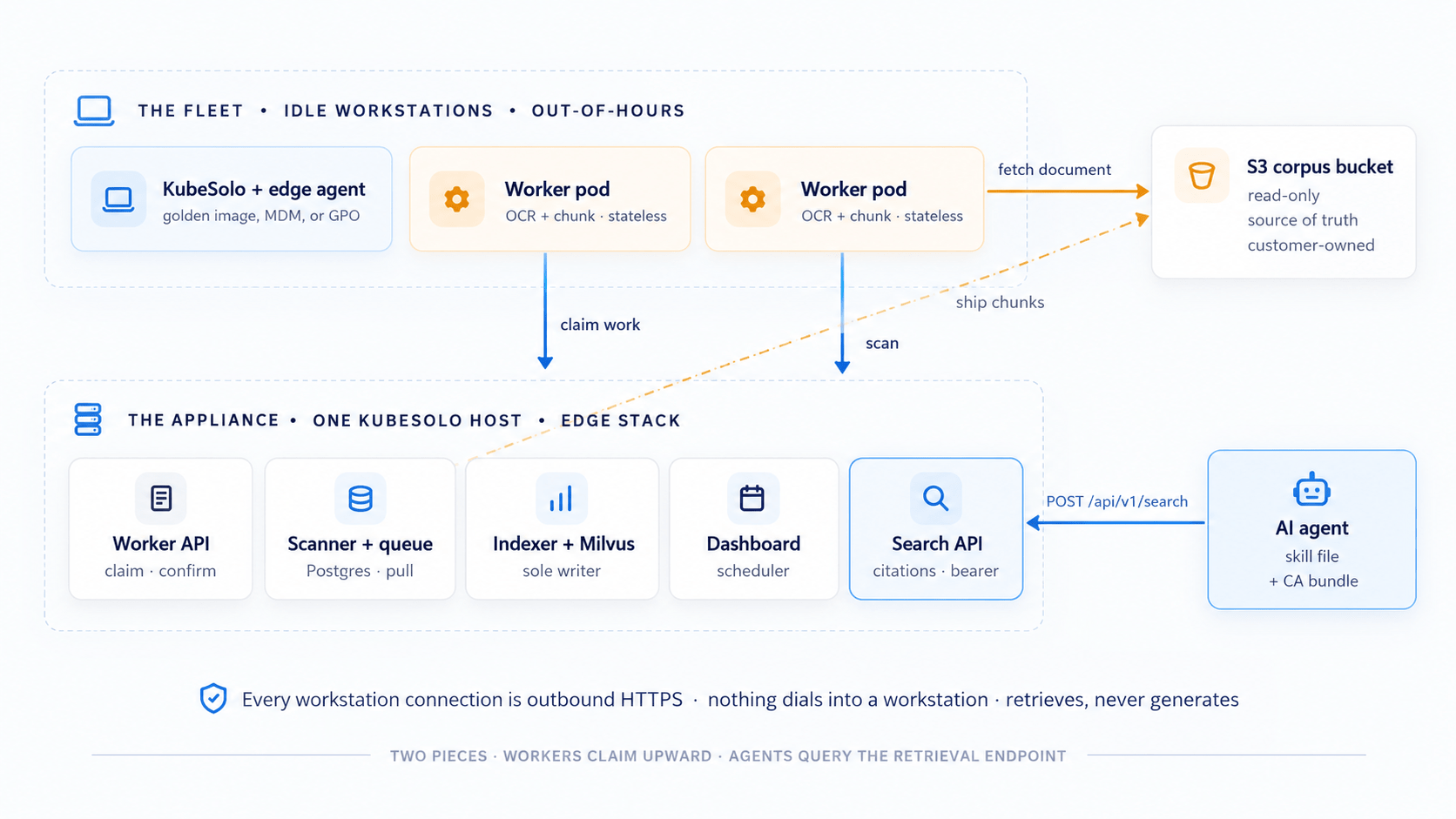
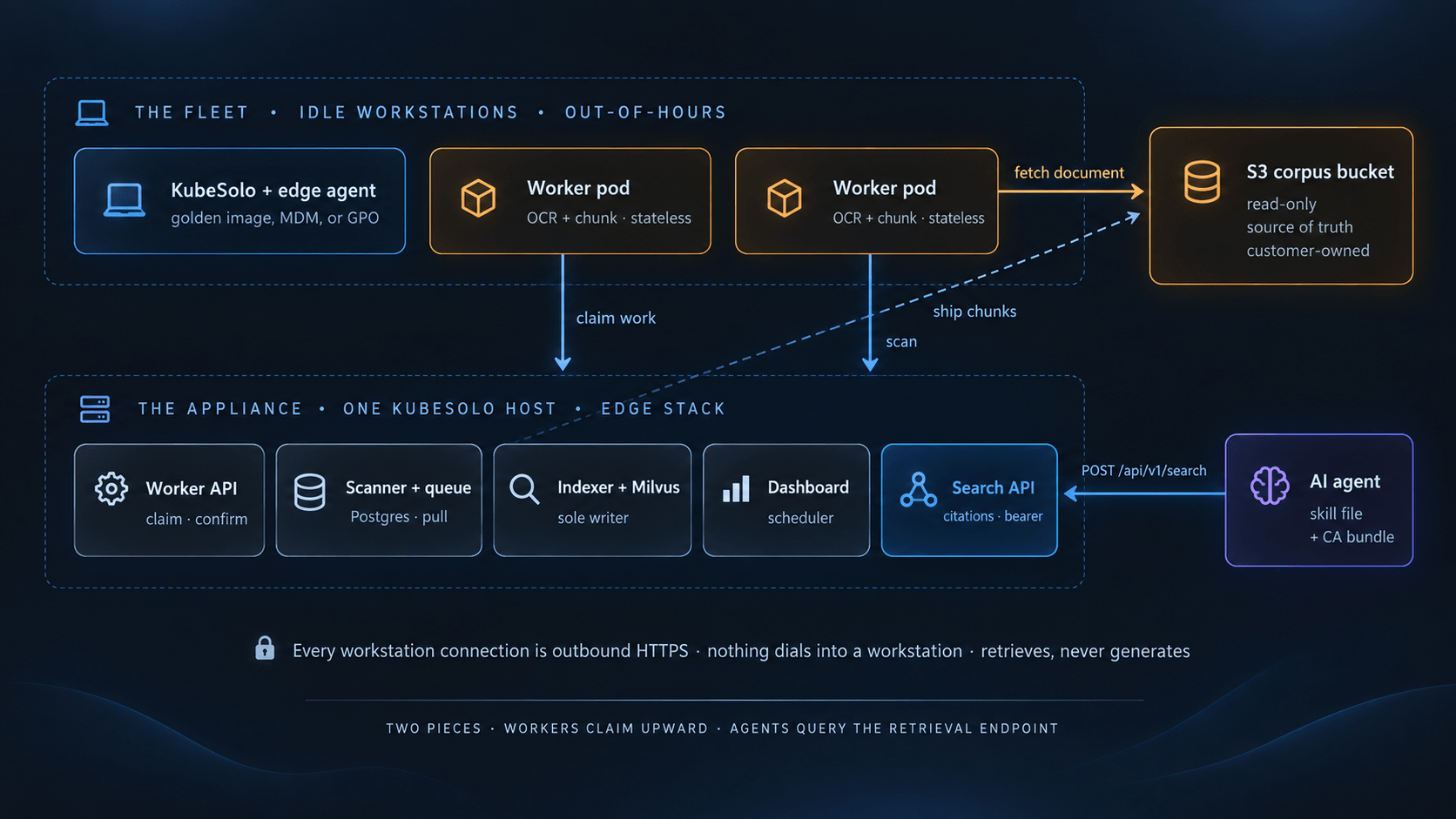
The appliance is the central brain. The workers are the fleet of workstations. Documents flow from your S3 bucket through the workers into the appliance's vector store, and agents query the retrieval endpoint. Every workstation connection is outbound HTTPS; nothing dials into a workstation.
Piece 01 · Central
The appliance
Delivered as a Kubernetes edge stack onto a single KubeSolo host, managed through Portainer Business. Contains everything stateful and is configured once via a four-step setup form; addresses, Portainer credentials, and the corpus connection are each proven before the next is asked for.
- Scanner + Postgres queue
- Milvus vector store
- Indexer loop (sole writer)
- Scheduler talking to Portainer API
- Retrieval API + operator dashboard
Piece 02 · Fleet
The workers
Each participating workstation runs KubeSolo and a Portainer edge agent, and receives the AiGrid worker as an edge stack. Onboarding is one byte-identical snippet on every machine (golden image, MDM, or GPO). The worker itself is stateless: nothing written to disk, no per-machine credential, identity is the node name.
- KubeSolo (single-node Kubernetes)
- Portainer edge agent for management
- AiGrid worker pod for OCR + chunking
- Docling with RapidOCR under the covers
Workers claim work; nothing is ever pushed to them
A worker inside its allowed window polls the appliance for work. Central checks the fleet-wide stop switch, evaluates the machine's capabilities against fleet policy (two OCR thresholds decide who takes heavy work), and hands back a unit together with short-lived S3 read credentials. The worker fetches, OCRs, chunks, ships back, confirms. A worker that dies mid-document simply loses its lease and the unit is re-queued, which is what makes a fleet of machines that get switched off at random a viable substrate.
Every claim the product makes reduces to one sentence
Workers never receive an inbound connection. The worker dials out to the appliance for work; the edge agent dials out to Portainer for management. No port is opened on any workstation, which is why the model works behind NAT, on laptops, and on home connections.
Secrets
Two, not a ladder
One fleet-wide claim token, minted at setup and delivered inside the fleet manifest. Per-claim S3 credentials that exist only for the duration of a unit. Nothing per-machine is issued, so nothing per-machine can be leaked.
Corpus access
Read-only, always
The appliance is granted read-only access to the corpus bucket and is never given write access. The corpus remains the single source of truth, and everything the appliance holds is derived and can be rebuilt by re-scanning.
Retrieval endpoint
HTTPS + bearer + private CA
The retrieval endpoint is HTTPS only, authenticated by a bearer search token, served under a private CA the appliance mints at setup. The client bundle ships the CA cert alongside the skill file so they cannot drift.
Structural boundary
Retrieves, never generates
The endpoint returns passages, not answers. The generation happens in the agent, cited to filename and page. There is no path in the architecture by which the appliance could invent an answer, so the failure mode is removed rather than mitigated.
Work window
Two conditions, two places
The fleet has one work window (default Mon-Fri 19:00-06:00), evaluated by each worker locally on its own clock, so a machine partitioned from the network still stops at 06:00. The stop switch belongs to central, read at claim time, off by default on a fresh install.
Data on the worker
The worker is stateless
Nothing is written to the workstation's disk. Conversion runs in a child process per 200-page window (the conversion library retains gigabytes only process exit returns); the child receives a file path and nothing else, so it holds neither the claim token nor the corpus credentials.
One archive, one skill file, agent-agnostic contract
The dashboard's Connect a client page hands the corpus reader one archive: a rendered skill file plus the CA certificate, packaged so the two cannot drift apart. Installed into an agent (Claude Code is the worked example), the skill teaches the agent to turn a user's question into focused queries against the search endpoint, read the returned passages, and answer grounded in them with filename and page citations, saying plainly when nothing relevant exists in the corpus rather than inventing.
Ranking fuses a dense vector search with a keyword search, so the score is a fusion value; the skill instructs agents to trust the order and judge relevance by reading, not by the magnitude of the number. The contract is agent-agnostic: any AI agent that can install a skill and call an HTTPS endpoint can consume AiGrid.
Six dashboard views, three fleet-policy controls, no ETA
The operator surface is six dashboard views (Overview, Queue, Machines, Documents with per-document event history, Fleet policy, Add a machine) plus the single-shot setup, with a fleet indicator in the header of every page stating whether the grid is taking work. Fleet policy holds exactly three controls: the stop switch, the one window, and the two OCR thresholds that decide which machines take heavy work; a threshold change is a database write that takes effect at the next claim, with no restart and no stack redeploy.
Ingestion progress is reported per unit as pages converted and chunks indexed, aggregated from state the pipeline already produces. There is deliberately no ETA, because a rate measured on one fleet is wrong on another. Install and upgrade are the same Portainer screen: open the edge stack, replace the image tags, update. Both appliance volumes are persistent volume claims that survive upgrades, and schema changes ship as migrations applied automatically.
Portainer-AiGrid, answered directly
Is Portainer-AiGrid a self-hosted RAG platform?
Yes. AiGrid is a fully self-hosted retrieval platform. The appliance runs inside your boundary on a KubeSolo host you provide, documents stay in your own S3-compatible bucket, and workers run on machines your organization already owns. Nothing transits to a third-party cloud, and the deployment supports air-gapped environments.
How does AiGrid compare to Glean or Onyx?
Glean is SaaS with a VPC option; the compute and index sit inside Glean's boundary, and pricing is per seat with enterprise deployments frequently running six figures annually. Onyx is open-source and self-hostable, licensing-free, but assumes dedicated cluster or GPU capacity for ingestion and embedding. AiGrid is self-hosted like Onyx and adds a distinct piece: the ingestion and embedding compute is harvested from idle workstations your organization already owns, so there is no dedicated GPU spend and no per-seat pricing on top. AiGrid retrieves rather than generates, and every returned passage carries a filename and page citation.
Can AiGrid run in an air-gapped environment?
Yes. The appliance runs on your own KubeSolo host, the corpus sits in your own S3-compatible bucket, and workers dial out over HTTPS from inside your network. Nothing about the model requires internet access, and Portainer's edge management is designed for regulated, distributed, and air-gapped environments.
Does AiGrid generate answers?
No. AiGrid retrieves; it never generates. The endpoint returns the most relevant passages for a query, and the agent on the other end reads them and forms the answer, citing filename and page. This removes the failure mode of an invented answer presented as coming from the corpus, structurally rather than by prompt discipline.
What does an organization install?
Two things. The appliance, delivered as a Kubernetes edge stack onto a single KubeSolo host, managed through Portainer Business, containing the scanner, queue, vector store, indexer, dashboard, and retrieval API. The workers are the fleet of participating workstations, each running KubeSolo and a Portainer edge agent, receiving the AiGrid worker as an edge stack. Onboarding is one byte-identical snippet on every machine.
How does an AI agent consume the endpoint?
The dashboard hands the corpus reader one archive: a rendered skill file plus the CA certificate, packaged so they cannot drift apart. Installed into an agent (Claude Code is the worked example, but the contract is agent-agnostic), the skill teaches the agent to turn a user's question into focused queries against the search endpoint, read the returned passages, and answer with filename and page citations.
Does document data leave the organization?
No. The corpus lives in your own S3-compatible bucket, and AiGrid is granted read-only access to it. Documents are pulled to workers for OCR and embedding inside your network, and never leave your infrastructure. The appliance holds derived data (chunks, embeddings, and metadata) that can be rebuilt by re-scanning if needed.
Do workstations receive inbound network connections?
No. Every workstation connection is outbound HTTPS: the worker dials out to the appliance for work, the edge agent dials out to Portainer for management. No port is opened on any workstation, which is why the model works behind NAT, on laptops, and on home connections.
What credentials does a workstation hold?
None per-machine. Secrets are two, not a ladder: one fleet-wide claim token, minted at setup and delivered inside the fleet manifest, and per-claim S3 credentials that exist only for the duration of a unit. Nothing per-machine is issued, so nothing per-machine can be leaked from a workstation.
When does AiGrid run work on workstations?
The fleet has exactly one work window (default Monday to Friday, 19:00 to 06:00), evaluated by each worker locally on its own clock. A machine partitioned from the network still stops at 06:00. There is also a fleet-wide stop switch that administrators control, off by default on a fresh install.
What happens if a workstation is turned off mid-document?
The unit is re-queued. Heartbeats renew a 30-second lease while a unit is in flight; a worker that dies loses its lease and the work returns to the queue. This is what makes a fleet of machines that get switched off at random a viable substrate.
How does the appliance decide which machines take heavy work?
Two OCR thresholds in fleet policy. Central evaluates the machine's reported capabilities against the policy at claim time, and hands back an appropriately sized unit. Judgment lives in central rather than being self-asserted by the worker, and a threshold change takes effect at the next claim with no restart and no stack redeploy.
How is progress reported?
Per unit, as pages converted and chunks indexed, aggregated from state the pipeline already produces. There is deliberately no ETA, because a rate measured on one fleet is wrong on another. The dashboard header states whether the grid is currently taking work.
How does upgrade work?
Install and upgrade are the same Portainer screen: open the edge stack, replace the image tags, update. Both appliance volumes are persistent volume claims that survive upgrades, and schema changes ship as migrations applied automatically. The workers pick up the new image on the next reconciliation.
What machines make good AiGrid workers?
Anything that runs KubeSolo (a single-node Kubernetes distribution designed to be lightweight enough for a workstation) and has enough CPU and memory to run docling with RapidOCR. Most modern developer and knowledge-worker workstations qualify; a mix of hardware ages is fine because the fleet policy routes heavy work to capable machines.
See it index a corpus on a live fleet
We will walk you through AiGrid ingesting a real corpus, show the fleet policy, and demonstrate the retrieval endpoint with an AI agent citing filename and page.
- Live demo on a real Kubernetes environment
- No obligation · a specialist will reach out to schedule
- Built on Portainer Business, trusted by 500,000+ users